
Every viewport, exactly right
Pages render at each device's true width — layouts wrap, break and reflow just like real life, with live pixel readouts. Pinch to zoom, rotate to landscape.
Open any URL at true iPhone, iPad and Mac viewports — straight from your iPhone or iPad, wherever you are. Real layouts at real widths, not a scaled screenshot.
A paid, one-time purchase. No accounts, no subscriptions, no tracking.
A live preview, right on this page — exactly how it behaves in the app.
Tap a device — the page reflows at that exact width, just like in the app. ← → to switch.
Everything you need to check a layout across every screen — without a laptop in reach.
Pages render at each device's true width — layouts wrap, break and reflow just like real life, with live pixel readouts. Pinch to zoom, rotate to landscape.
Tap to inspect any element — size, padding, font, colour — or measure the gap between two. Catch console errors and find layout overflow, right on device.
On iPad in landscape, line up phone, tablet and desktop — one URL, three true widths, configured independently.
Snapshot the preview, mark it up, and send it straight to your team, chat or pull request.
iPhone, iPad and 6 Macs — plus any custom width × height. Star the ones you use most.
Point ViewPortal at localhost or a 192.168.x.x dev server — or reach your always-on home Mac from anywhere over Tailscale. Catch breakpoint bugs before you ship.
No accounts, no analytics, no tracking. URLs, favourites and preferences stay on your device and are never transmitted.
The hero feature. On iPad in landscape, line up every screen size side by side and watch the same page render at three true widths simultaneously.
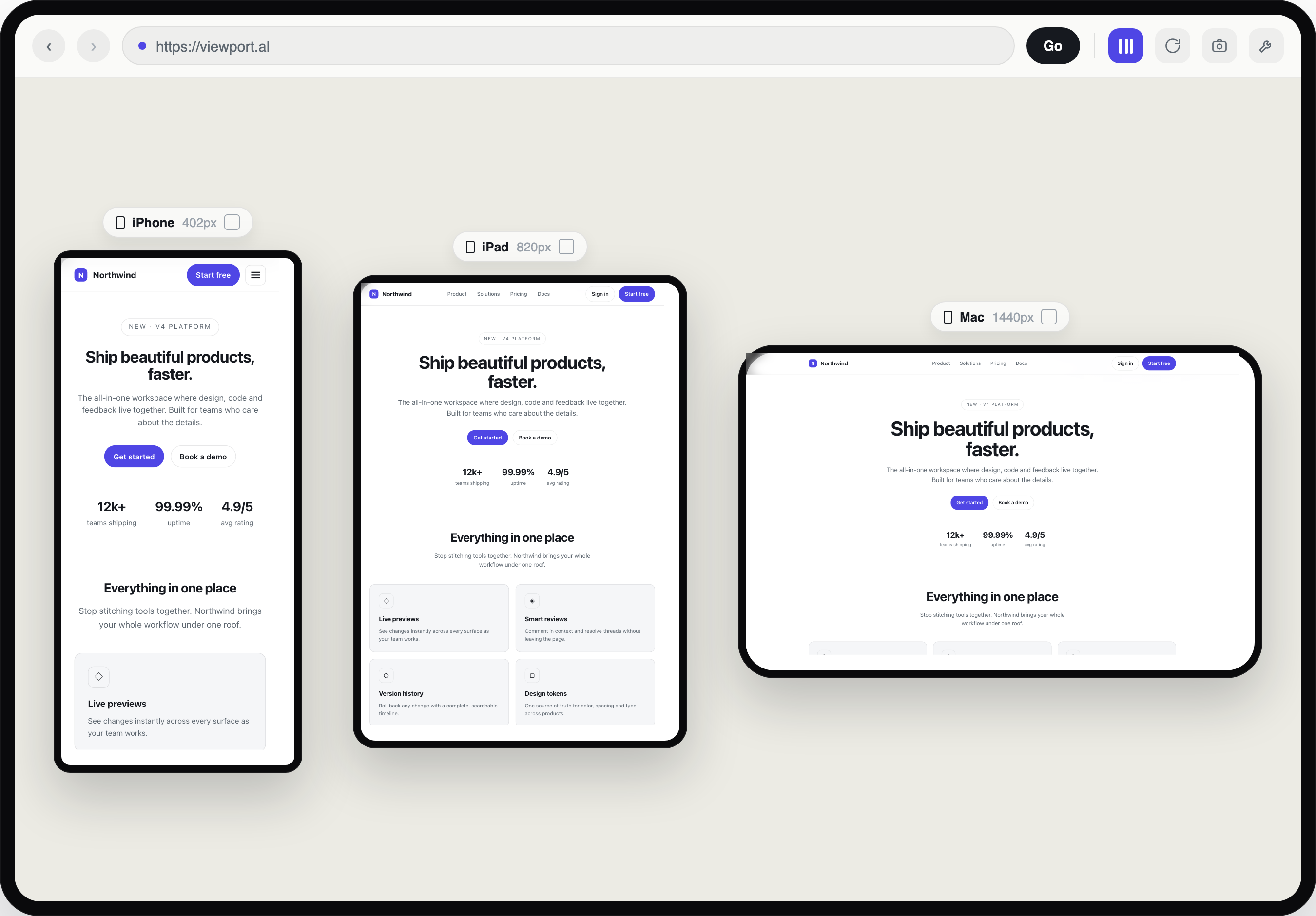
ViewPortal isn't just a viewer. Inspect any element, watch the console and find layout overflow — the tools you'd reach for on a laptop, right in your pocket.
ViewPortal loads any URL in a real browser engine and forces the page's layout viewport to each device's exact width — so media queries and breakpoints fire correctly. What you see is what your visitors get.
Any public site, or your own localhost / LAN dev server.
Choose from iPhone, iPad and Mac presets — and rotate to taste.
The page reflows at the true width, with the exact pixel size shown.
I'm increasingly coding from my phone — prompting AI agents to make changes while I'm on the go.
I kept wanting to check how a desktop-sized layout looked, confirm an agent's change was right, or reproduce a bug report across every device size — without a laptop in reach.
ViewPortal is the tool I wanted: open any URL and see it at true iPhone, iPad and Mac viewports, straight from your iPhone.
innerWidth and media queries fire correctly — not a scaled-down screenshot. The live readout shows the precise pixel dimensions you're testing.localhost or a 192.168.x.x address to preview work in progress and catch breakpoint bugs before you ship. Local network access is requested only for previewing your own dev servers.ViewPortal is available now on the App Store for iPhone and iPad. A paid, one-time purchase — no accounts, no subscriptions, no tracking.
Download on the App Store